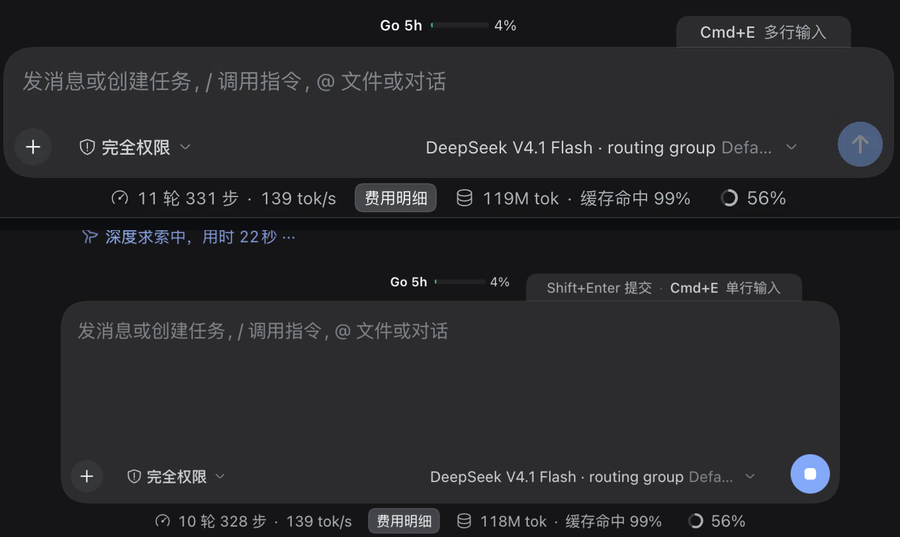
把对话输入框在单行 / 多行之间切换,Enter 与 Shift+Enter 的语义跟着换。输入法、撤销历史、斜杠与引用菜单仍走 DSH 原生逻辑,模式按设备记住。Switches the composer between single-line and multiline, and swaps Enter with Shift+Enter along the way. IME input, undo history, and the slash and mention menus still run through DSH's own logic; the mode is remembered per device.
上:单行模式;下:多行模式(真实界面截图拼接)Top: single-line mode; bottom: multiline mode (two real screenshots, stacked)
它解决什么What it does
一个键,两种输入节奏One keystroke, two ways to type
DSH 原生输入框固定一行高,Enter 直接发送。写长提示词时,要么一路 Shift+Enter 手动换行,要么先在别处写好再贴进来。这个插件只做一件事:让输入框记住这台设备上该用单行还是多行,并把按键语义一起换过去。The native composer is one line tall and Enter sends immediately. For a long prompt you either press Shift+Enter for every line or draft it elsewhere and paste it in. This plugin does one thing: let the composer remember whether this device wants one line or several, and move the key bindings along with it.
快捷键与常驻 tabA shortcut and an always-on tab
桌面版默认 Cmd+E(macOS)/ Ctrl+E(Windows、Linux),可在 DSH 设置里改成任意组合。输入框上沿有一个与输入框同底色的小 tab,实时显示当前键位与目标模式;它常驻显示,输入文字时也不隐藏,点击同样能切换。The desktop default is Cmd+E on macOS and Ctrl+E on Windows/Linux, rebindable in DSH settings. A small tab in the composer's own fill rides the card's top edge and shows the current binding and the target mode. It stays visible while you type, and clicking it toggles too.
多行从 4 行开始Multiline starts at four lines
多行模式默认 4 行高(代码常量 MIN_LINES = 4,落在 3–5 行区间内),内容变多自动长高,到 DSH 原生 336px 上限后滚动。起始高度是常量,暂不提供配置项。Multiline starts four lines tall (the constant MIN_LINES = 4, inside the 3–5 line range), grows as the draft grows, and scrolls once it hits DSH's native 336 px cap. The starting height is a constant and not configurable yet.
Enter 与 Shift+Enter 互换Enter and Shift+Enter trade places
单行保持 DSH 原生:Enter 发送、Shift+Enter 换行。多行反过来:Enter 换行、Shift+Enter 发送。Cmd/Ctrl+Enter 在两种模式下都是加速提交,语义不动。Single-line stays native: Enter sends, Shift+Enter breaks the line. Multiline flips it: Enter breaks, Shift+Enter sends. Cmd/Ctrl+Enter still submits immediately in both modes.
原生逻辑全保留Native behaviour is left intact
斜杠 / 引用菜单打开时 Enter 仍是选中菜单项;输入法候选态的 Enter 交给输入法;撤销历史与 busy-enter(queue / steer)也照旧。实现是在 document 捕获阶段拦下多行模式的 Enter,向编辑器重放一个翻转了 shiftKey 的合成按键,最终由 DSH 自己的 composer keymap 决定换行还是提交。Enter still picks an item when the slash or mention menu is open, composition-time Enter goes to the IME, and undo history and busy-enter (queue/steer) behave as before. The mechanism is narrow: catch Enter in document capture while in multiline mode, then replay a synthetic key to the editor with shiftKey flipped, leaving DSH's own composer keymap to choose newline or submit.
模式按设备记住The mode is remembered per device
模式存在模块级 store 里,写入 localStorage['dsh-multiline-input.mode.v1'],并投影为 <html data-dsh-multiline-input="multi">。刷新或重启后保持上次的选择;切换不清空草稿、不抢焦点。The mode lives in a module-level store, is written to localStorage['dsh-multiline-input.mode.v1'], and is projected onto the page as <html data-dsh-multiline-input="multi">. It survives reloads and restarts, and switching never clears the draft or steals focus.
快捷键走 DSH 官方服务Bindings go through DSH's shortcut service
通过 ctx.shortcuts.register() 注册命令 multiline-input.toggle,名称「切换多行输入」。在「设置 → 通用 → 快捷键」里改键、查冲突、恢复默认都由官方界面负责;tab 实时跟随当前生效的组合,绑定清空后只显示「多行输入 / 单行输入」,点击仍可切换。It registers the command multiline-input.toggle (“Toggle multiline input”) through ctx.shortcuts.register(). Rebinding, conflict checks and restoring defaults all happen in DSH's Settings → General → Keyboard shortcuts. The tab follows the active binding in real time; clear the binding and it shows just “Multiline input / Single-line input”, still clickable.
轻量:无构建、无第三方依赖Light: no build, no dependencies
client.js 是手写的一个文件,没有构建步骤,也没有第三方依赖;Host 半只保留一个可安装 / 启停的 bundle row,功能全部在浏览器端。client.js is one hand-written file with no build step and no third-party dependencies. The host half is a single bundle row that can be installed, enabled and disabled; all of the behaviour runs in the browser.
一条 CSS 规则,一个覆盖层座位One CSS rule, one overlay slot
高度只靠一条规则:[data-composer-card] [data-composer-input][contenteditable="true"] { min-height: calc(4 * 1lh + 8px) },不支持 1lh 时回退到 4×24+8 px。tab 注册在 conversation.input.overlay 座位,绝对定位到卡片上沿右侧,不改原生编辑器的其它行为。Height comes from one rule: [data-composer-card] [data-composer-input][contenteditable="true"] { min-height: calc(4 * 1lh + 8px) }, falling back to 4×24+8 px where 1lh is unsupported. The tab is registered in the conversation.input.overlay slot, pinned to the card's top-right edge, and nothing else about the native editor changes.
界面Interface
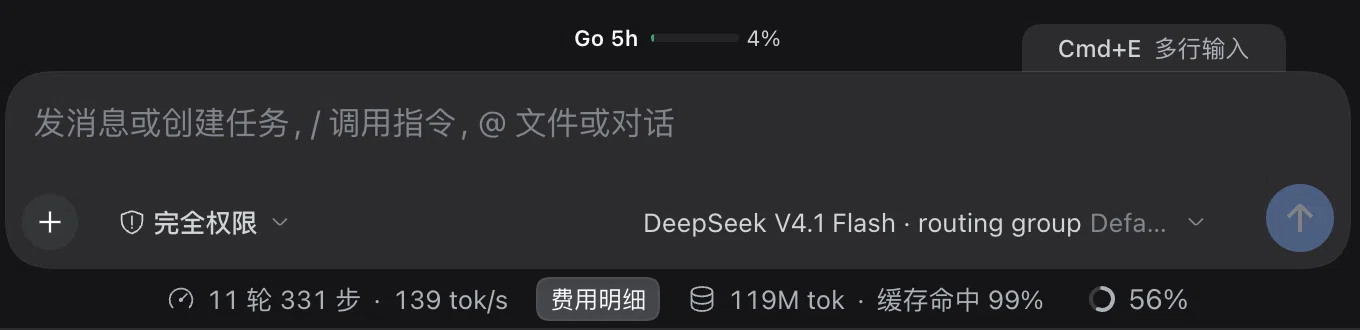
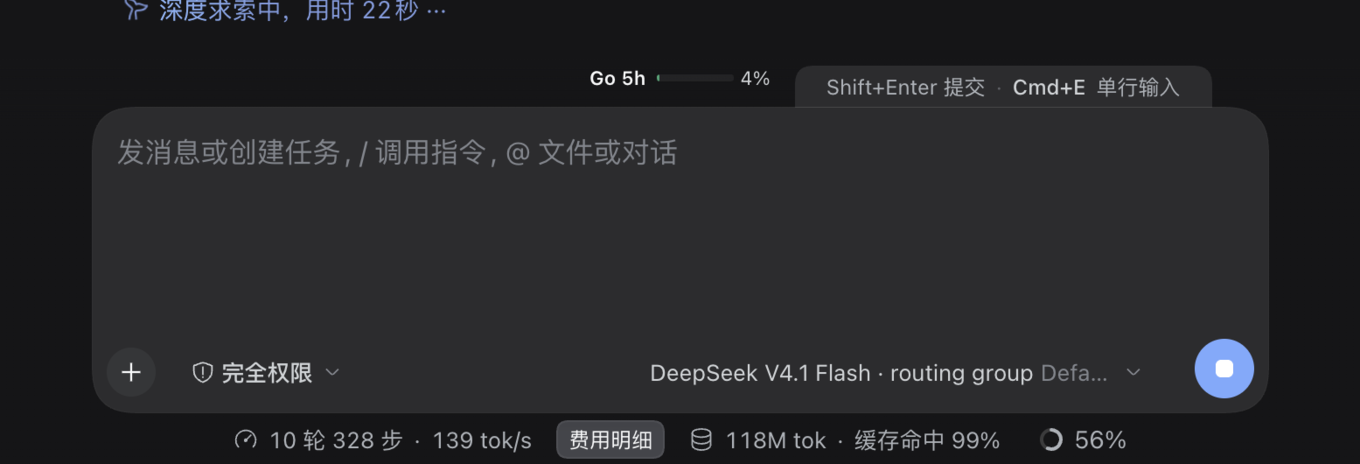
两种模式,差别只在高度和一行提示Two modes, differing only in height and one line of text
截图来自真实界面(深色主题),对话内容为演示数据;下面是两种模式的按键语义对照。Real screenshots from the actual UI (dark theme); conversation content is demo data. The key map for both modes is below.
单行模式Single-line mode —— 输入框一行高,tab 显示当前键位与目标模式「Cmd+E 多行输入」;Enter 发送,Shift+Enter 换行,和 DSH 原生一致。 — one line tall, with the tab showing the binding and the target mode (“Cmd+E multiline”). Enter sends, Shift+Enter breaks the line, exactly as native.
多行模式Multiline mode —— 输入框抬到 4 行高,内容变多继续长高;tab 文案变成「Shift+Enter 提交 · Cmd+E 单行输入」,此时 Enter 换行。 — four lines tall and still growing with the draft; the tab now reads “Shift+Enter to send · Cmd+E single-line”, and Enter inserts a newline.
键位Key
单行模式Single-line
多行模式Multiline
Enter
发送Send
换行Newline
Shift+Enter
换行Newline
发送Send
Cmd/Ctrl+Enter
加速提交(不变)Submit immediately (unchanged)
加速提交(不变)Submit immediately (unchanged)
菜单打开时的 EnterEnter with a menu open
选中菜单项Pick the menu item
选中菜单项Pick the menu item
输入法候选态的 EnterEnter while the IME is composing
交给输入法Goes to the IME
交给输入法Goes to the IME
怎么工作How it works
一个属性、一条 CSS、一次按键重放One attribute, one CSS rule, one replayed key
功能全部在 client.js 里:把模式投影成页面属性,把高度交给 CSS,把 Enter 换成一个翻过 shiftKey 的合成按键。剩下的判断仍然归 DSH。Everything lives in client.js: project the mode onto an attribute, hand height to CSS, and turn Enter into a synthetic key with shiftKey flipped. Every other decision stays with DSH.
启动时读回模式,投影到 <html>Read the mode back on start, project it onto <html>
模块级 store 从 localStorage['dsh-multiline-input.mode.v1'] 读回 single / multi,再把 data-dsh-multiline-input="multi" 写进 <html>;切换时两处同步更新。卸载或停用时移除该属性及其监听,回单行时属性直接去掉。A module-level store reads single / multi back from localStorage['dsh-multiline-input.mode.v1'], then writes data-dsh-multiline-input="multi" onto <html>; toggling updates both. Disabling the plugin removes the attribute and its listeners; switching back to single just drops it.
高度交给 CSS,tab 占一个座位Height goes to CSS, the tab takes one slot
多行时那条选择器把输入面的 min-height 抬到 calc(4 * 1lh + 8px),不支持 1lh 的浏览器回退到 4×24+8 px;到 DSH 原生 336px 上限后仍是原生滚动。tab 注册在 conversation.input.overlay 座位,绝对定位到卡片上沿右侧,等快捷键目录就绪后显示当前组合。In multiline the selector raises the editable surface's min-height to calc(4 * 1lh + 8px); browsers without 1lh fall back to 4×24+8 px, and DSH's native 336 px cap and scrolling still apply. The tab is registered in the conversation.input.overlay slot, pinned to the card's top-right edge, and shows the active binding once the shortcut catalog is ready.
Enter:捕获阶段拦下,再重放一次Enter: caught in capture, then replayed once
只在多行模式、事件落在输入框可编辑面上、阶段是 plain、没有 Ctrl / Cmd / Alt、输入法不在组合态、斜杠或引用菜单未打开时才动手;然后用一个翻转了 shiftKey 的合成 keydown 交给编辑器。换行还是提交,仍由 DSH 的 composer keymap 决定 —— 所以撤销历史、busy-enter(queue / steer)和菜单仲裁都是原样的。It only acts in multiline mode, on the composer's editable surface, in the plain phase, without Ctrl/Cmd/Alt, while the IME is not composing and the slash or mention menu is closed. Then it hands the editor a synthetic keydown with shiftKey flipped. DSH's own composer keymap still decides newline or submit — which is why undo history, busy-enter (queue/steer) and menu arbitration stay untouched.
快捷键交给 DSH 的快捷键服务The binding belongs to DSH's shortcut service
用 ctx.shortcuts.register() 注册命令 multiline-input.toggle(名称「切换多行输入」),默认键位按平台给:桌面版 Cmd/Ctrl+E,浏览器里的 Web 只接受白名单内的组合。改键、冲突校验、恢复默认全在官方设置页,tab 订阅快捷键目录并实时跟随。The command multiline-input.toggle (“Toggle multiline input”) is registered through ctx.shortcuts.register() with per-platform defaults: Cmd/Ctrl+E on desktop, and allowlisted chords only in a browser. Rebinding, conflict checks and restoring defaults all live in DSH's settings, and the tab subscribes to the catalog to follow the active binding.
Cmd+E / Ctrl+E  ·  click the tab
        │   DSH shortcut command `multiline-input.toggle` → toggle()
        ▼
mode store (module scope)  ──►  localStorage['dsh-multiline-input.mode.v1']
        │
        ├──► <html data-dsh-multiline-input="multi">
        │        └─ CSS  html[data-dsh-multiline-input="multi"]
        │                [data-composer-card] [data-composer-input][contenteditable="true"]
        │                { min-height: calc(4 * 1lh + 8px) }     ← 4 行下限
        │
        ├──► conversation.input.overlay slot
        │        └─ tab on the card's top shoulder: “Shift+Enter 提交 · Cmd+E 单行输入”
        │
        └──► document capture phase · keydown Enter(仅多行模式)
                 └─ replay a synthetic keydown on the editor, shiftKey flipped
                        └─ DSH composer keymap decides: newline or submit
                               (IME / slash menu / undo / busy-enter untouched)
本地运行:插件不发网络请求、不注册模型工具、不注入系统提示词,正常对话的 token 开销为 0;所有逻辑只改当前页面里的输入框状态。Runs locally: the plugin makes no network requests, registers no model tools and injects no system prompt, so normal conversations cost zero tokens. All it changes is the composer state in the current page.
安装Install
三条命令,按你的 profile 选Three commands, depending on your profile
桌面版在应用内「插件」页安装;desktop profile 由应用独占,命令行不接管。启用后刷新页面即可 —— 插件清单变化不需要重启应用。In the desktop app, install from the Plugins page; the desktop profile is app-managed and off-limits to the CLI. After enabling, just refresh the page — plugin-list changes need no app restart.
卸载:dsh plugin --profile <profile> remove dsh-multiline-input,或在插件页关闭 / 卸载;停用后输入框回到 DSH 原生行为。Uninstall with dsh plugin --profile <profile> remove dsh-multiline-input, or disable/uninstall it from the Plugins page; the composer returns to native behaviour.
桌面版手动 link:dsh plugin --profile desktop 会被拒绝,所以先进 ~/.dsh/profiles/desktop 执行 pnpm add link:/absolute/path/to/dsh-multiline-input,再把 "dsh-multiline-input" 追加到 package.json 的 dsh.profile.bundles。之后刷新页面即可。Manual link for the desktop app:dsh plugin --profile desktop is refused, so run pnpm add link:/absolute/path/to/dsh-multiline-input inside ~/.dsh/profiles/desktop and append "dsh-multiline-input" to dsh.profile.bundles in its package.json. Then refresh the page.
兼容性Compatibility
实测环境与已知限制Tested environment and limits
项Item
说明Details
实测宿主Tested host
DSH 0.2.1-rc.3(桌面版与 Web)DSH 0.2.1-rc.3 (desktop app and Web)
声明范围Declared range
>=0.2.1-rc.3 <0.3.0-0
平台Platform
只作用于 Web GUI(桌面版与浏览器),TUI / CLI 不适用Web GUI only (desktop app and browsers); it does not apply to the TUI or CLI
浏览器里的默认键Default key in a browser
Web 只接受 DSH 白名单内的组合,默认是 Cmd/Ctrl+Shift+E;Web + Linux 没有默认快捷键,需要自己在设置里指定一个The Web build only accepts allowlisted chords and defaults to Cmd/Ctrl+Shift+E; Web on Linux has no default binding and needs one picked in settings
依赖的内部实现Relies on internals
依赖 composer 的 data-* 锚点与 role="listbox" 等 DSH 内部实现;升级 DSH 后需要回归一次,锚点缺失时插件只 warn,不会崩Depends on the composer's data-* anchors and role="listbox" — DSH internals. Re-test after a DSH upgrade; a missing anchor only logs a warning, it does not crash
多行起始高度Starting height
代码常量 4 行,暂不提供配置项A code constant of four lines; no setting for it yet
键位冲突Binding conflicts
默认键位与其它插件的命令默认值冲突时会降级为「点击 tab 切换」,并只在控制台警告一次If the default clashes with another plugin's command, it degrades to click-the-tab switching and warns once in the console
运行时依赖Runtime deps
无;无构建步骤,功能全在浏览器端None; no build step, and all behaviour runs in the browser
FAQ
常见问题Frequently asked
怎么改快捷键?How do I change the shortcut?
打开「设置 → 通用 → 快捷键」,搜索「多行输入」(命令名「切换多行输入」,id multiline-input.toggle),点击右侧键位进入录制,按下新组合即可。冲突由官方界面提示,随时可以恢复默认;tab 会实时跟随新的组合。Open Settings → General → Keyboard shortcuts, search for “multiline input” (the command is “Toggle multiline input”, id multiline-input.toggle), click the binding on the right to record, and press the new chord. Conflicts are reported by DSH's own UI, defaults can be restored at any time, and the tab follows the new binding immediately.
会不会打断输入法?Does it get in the way of the IME?
不会。输入法处于组合态(isComposing,或 keyCode === 229)时,Enter 一律交给输入法,插件不拦。选词、上屏这些行为与原生一致。No. While the IME is composing (isComposing, or keyCode === 229) every Enter goes to the IME and the plugin stays out of the way. Picking candidates and committing text behave exactly as native.
为什么 Web + Linux 没有默认快捷键?Why is there no default shortcut on Web + Linux?
DSH 对 Web 端可选的组合有白名单限制,Linux 上没有落在白名单内的字母组合可用,所以插件不自作主张绑定。去「设置 → 通用 → 快捷键」里自己指定一个即可,tab 会跟着显示出来。DSH only accepts allowlisted chords on the Web, and no letter chord on Linux falls inside that list, so the plugin does not bind one on its own. Pick one in Settings → General → Keyboard shortcuts and the tab will show it.
卸载后有残留吗?Does uninstalling leave anything behind?
没有。停用或卸载后输入框回到 DSH 原生行为:<html> 上的模式属性被移除,插入的样式与 tab 撤掉,键盘监听与快捷键命令一并释放。No. After disabling or uninstalling, the composer behaves natively again: the mode attribute is removed from <html>, the injected style and tab are torn down, and both the key listener and the shortcut command are released.
多行模式下怎么发送?How do I send in multiline mode?
按 Shift+Enter 发送;Cmd/Ctrl+Enter 仍然是加速提交,两种模式下都不变。想回到 Enter 发送,再按一次 Cmd/Ctrl+E(或点 tab)切回单行即可,草稿不会丢。Press Shift+Enter to send; Cmd/Ctrl+Enter still submits immediately in either mode. To get Enter-sends back, press Cmd/Ctrl+E again (or click the tab) to return to single-line — the draft is kept.
同一个作者:用 Swift 从头写的原生 Apple Silicon 鼠标手势工具,兼容 WGestures 2 配置。By the same author: a native Apple Silicon mouse-gesture tool written in Swift, compatible with WGestures 2 configs.