把整段会话总结成一条标题,确认后才写入。顶栏按钮和会话行菜单两处入口;生成阶段完全不写会话日志,也不替换 DSH 自带的自动标题。Summarises the whole session into one title and writes it only after you confirm. Two entry points — the header button and a session row's menu — and nothing touches the session log while a title is being drafted, nor does it replace DSH's own automatic titling.
v0.2.1MITDSH ≥0.2.0-rc.1 <0.3.0-0实测 0.2.1-rc.2Tested on 0.2.1-rc.2Web 插件Web plugin零运行时依赖Zero runtime deps
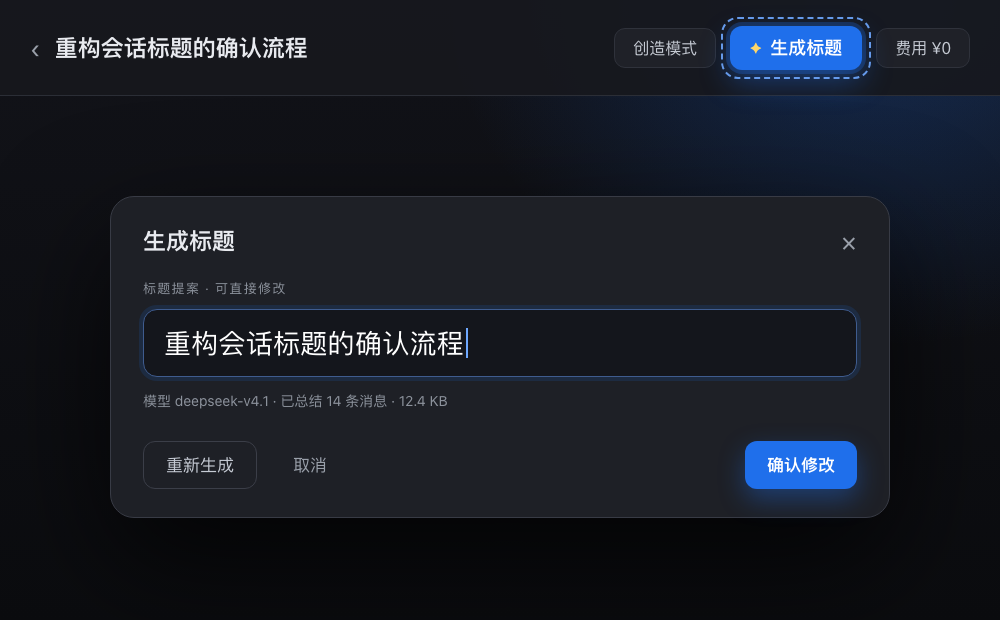
顶栏按钮与确认弹窗(界面示意)The header button and the confirm dialog (interface illustration)
它解决什么What it does
一条标题,覆盖整段对话One title for the whole conversation
DSH 自带的自动标题按第一条消息(或每次提示)决定名字,往往对不上会话后来变成的样子。这个按钮读的是整段会话,生成一条候选标题,交给你改,最后才写回。DSH's built-in titling decides from the first prompt — or from every prompt — which often misses what the conversation turned into. This button reads the whole session, proposes one title, hands it to you to edit, and writes only at the end.
两处入口,不新增页面Two entry points, no new page
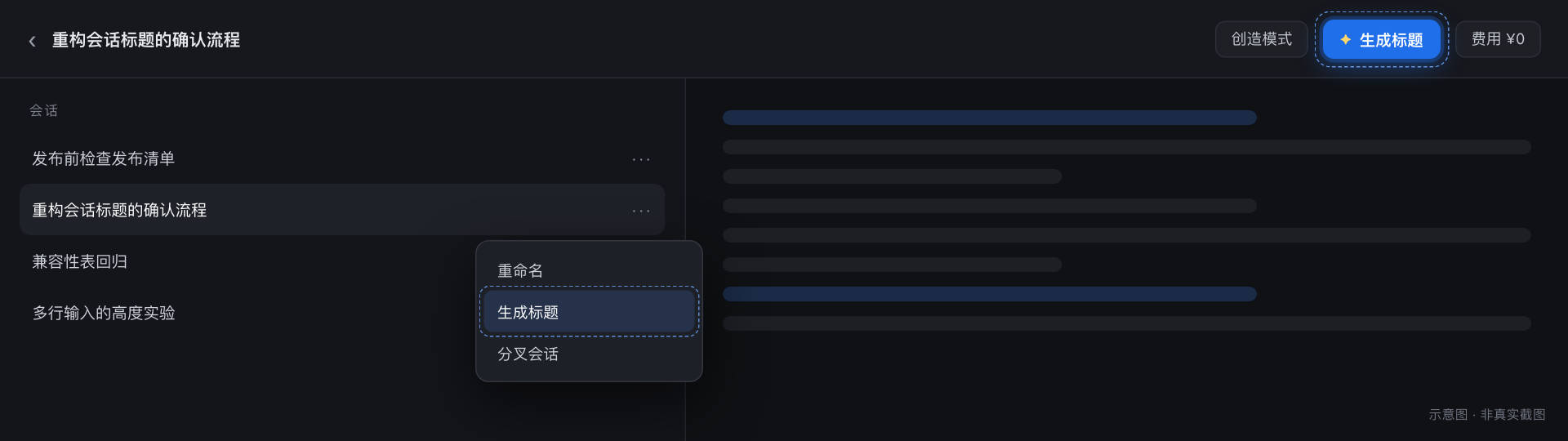
顶栏「✦ 生成标题」在会话标题栏(座位 conversation.session.header.actions,order: -8):「创造模式」右边、「费用」左边。会话行「…」菜单的「生成标题」在「重命名」下面、「分叉会话」上面(座位 sidebar.workspaces.session.menu.item,order: 250)。“✦ Generate title” sits in the session header (slot conversation.session.header.actions, order: -8) — right of the agent-preset chip, left of the cost chip. Each session row's “…” menu carries “Generate title” (slot sidebar.workspaces.session.menu.item, order: 250), between Rename and Fork.
整段对话当输入The whole conversation as input
只读当前会话的「模型表面」(已考虑压缩 / 替换),在 32 KiB 预算内组装 transcript。超了先按单条消息裁剪,再从中间整条丢弃 —— 保留开头(任务目标)与结尾(当前状态);仍然超就截尾部字符,并标 truncated: true。It reads only the session's current model surface (compaction and replacement already applied) and assembles a transcript within a 32 KiB budget. Over budget, single messages are trimmed first, then whole messages are dropped from the middle — keeping the opening (the goal) and the end (the current state); anything still over is cut from the tail and flagged truncated: true.
生成阶段完全不写Nothing is written while generating
POST /session-titler/propose 只读;取消、Esc、点遮罩都不落盘。只有点「确认修改」才走 ctx.sessions.using(...) → binding.session.rename(title),与官方「重命名」同一条写入路径,Host 追加 session/title 事件(source: user)。POST /session-titler/propose is read-only: Cancel, Esc and the backdrop write nothing. Only “Apply” goes through ctx.sessions.using(...) → binding.session.rename(title) — the same path as the official Rename command — appending a session/title event (source: user).
不注册 title providerNo title provider registered
不碰 ctx.sessionTitle 的 provider:那个座位是独占的,注册了就会顶掉 DSH 自带的自动标题;而且它只有 first-prompt / all-prompts 两档,没有「只在点击时才生成」。所以本插件走自己的显式调用,后台从不为任何会话生成标题。It leaves ctx.sessionTitle alone: that slot is exclusive, so registering would displace DSH's built-in titler — and it only offers first-prompt / all-prompts, with no “only when clicked”. So the plugin makes its own explicit call and never titles anything in the background.
模型路由跟随会话The route follows the session
候选按「新 → 旧」试:活会话的 requestHeader().config → 日志里每条 request/header → agentDefaultModel 默认模型;每个候选都必须出现在 llm.listProviders() 里(探测失败则不过滤)。都不可用就回退,弹窗写明「使用模型:X(已回退)」。Candidates are tried newest to oldest: the live session's requestHeader().config, then every request/header in the log, then the agentDefaultModel default. Each candidate must appear in llm.listProviders() (a failed probe means no filtering). If none is usable it falls back, and the dialog says “Using model: X (fallback)”.
标题归一化,不切坏字符Normalised, never cut mid-character
取模型回答的第一条可用行,再按 DSH 的 normalizeSessionTitle 归一化:剥掉 OSC / CSI / ESC 控制序列、C0 / C1 控制符与方向性不可见字符,空白折叠成一行,按 code point 截到 120 字节。It takes the first usable line of the answer and normalises it the way DSH's normalizeSessionTitle does: strip OSC/CSI/ESC sequences, C0/C1 controls and directional invisibles, collapse whitespace to a single line, and cut to 120 bytes by code point.
空白会话没有可总结的内容:表面里没有 user / assistant 文本,按钮直接置灰,也不会发出任何请求。An empty session has nothing to summarise: with no user or assistant text in its surface, the button is disabled and no request is sent at all.
界面Interface
入口在标题栏,确认在弹窗Entry in the header, confirmation in a dialog
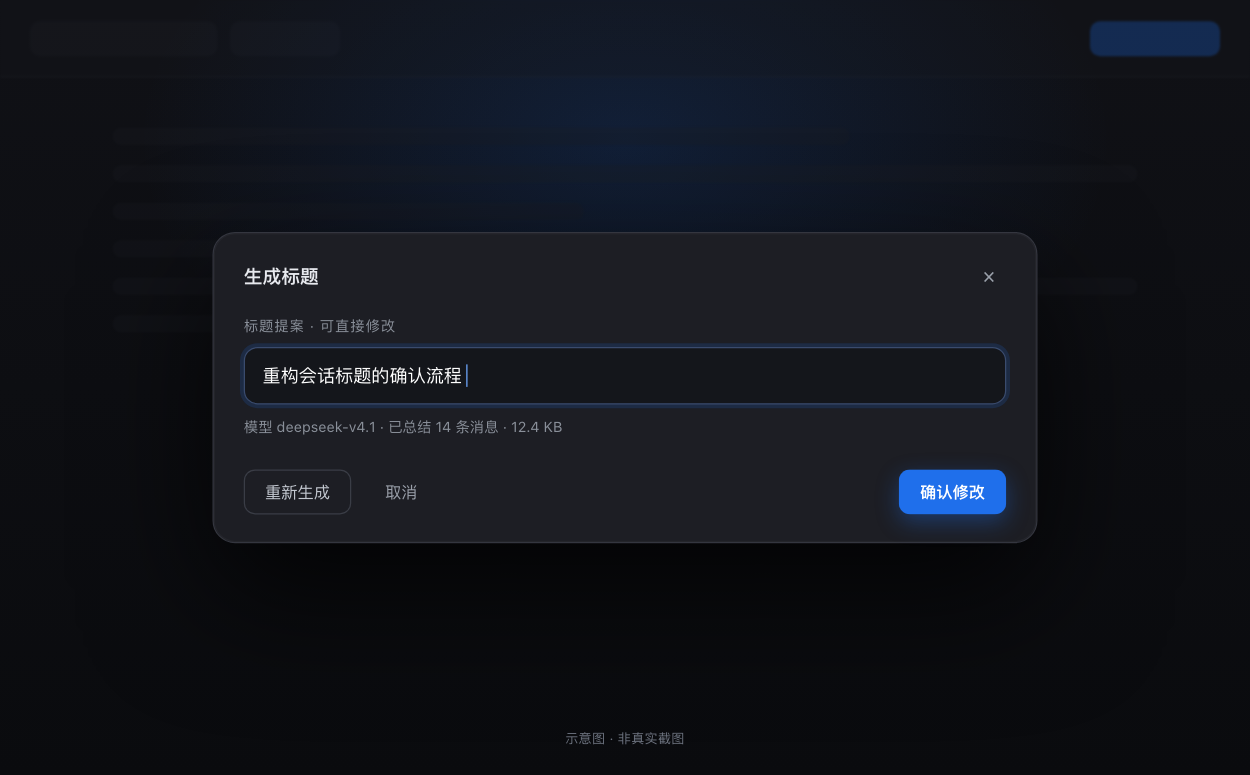
第一张看两个入口坐在哪,第二张看确认弹窗里能做什么。The first shows where the two entries sit; the second what the confirm dialog lets you do.
两个入口Two entry points —— 顶栏「✦ 生成标题」在「创造模式」右边、「费用」左边;会话行「…」菜单的「生成标题」在「重命名」下面、「分叉会话」上面。空白会话时置灰。 — “✦ Generate title” sits between the agent-preset chip and the cost chip in the header; “Generate title” in a session row's “…” menu sits between Rename and Fork. Disabled on an empty session.
确认弹窗Confirm dialog —— 标题可直接编辑,也可重新生成;取消 / Esc / 点遮罩都不写盘,只有「确认修改」才写入。 — the proposal is editable and can be regenerated; Cancel, Esc and the backdrop write nothing, only “Apply” does.
两张配图都是按真实界面重绘的界面示意,不是实际截图;会话标题与模型名均为演示内容。Both images are interface illustrations redrawn from the real UI, not screenshots; session titles and model names are demo content.
怎么工作How it works
生成只读,写入只有一条路径Generation is read-only; there is exactly one write path
点入口,只打开弹窗Clicking an entry only opens the dialog
按钮与菜单项都调 store.open({ sessionId, currentTitle });空白会话在按下之前就已经置灰,不会发请求。Both the button and the menu item call store.open({ sessionId, currentTitle }); an empty session is already disabled before you can press it, so no request goes out.
一次只读的提案请求One read-only proposal request
Client 发 POST /session-titler/propose { sessionId };Host 读模型表面、选路由、组 transcript,再走 ctx.llm.stream({ …, purpose: 'session-title' })(优先 llm.stream,兜底 llm.prepareCall)。The client sends POST /session-titler/propose { sessionId }; the host reads the model surface, picks a route, builds the transcript, then calls ctx.llm.stream({ …, purpose: 'session-title' }) — llm.stream first, llm.prepareCall as the fallback.
弹窗给你一份可改的提案The dialog hands you an editable proposal
拿回 { ok:true, value:{ title, provider, model, fallback, messages, truncated } },连同实际使用的模型一起显示。这时会话日志还没有任何变化。It gets back { ok:true, value:{ title, provider, model, fallback, messages, truncated } } and shows it together with the model actually used. At this point the session log is still untouched.
确认才写入Confirming is what writes
点「确认修改」→ ctx.sessions.using(id, { source:'workspaceOperation' }, ref => ref.binding.session.rename(title)),与官方「重命名」菜单同一条路径。“Apply” runs ctx.sessions.using(id, { source:'workspaceOperation' }, ref => ref.binding.session.rename(title)) — the same path as the official Rename menu command.
Host 追加标题事件The host appends a title event
写入 session/title 事件(source: user);左侧列表标题立即刷新,刷新页面也还在。A session/title event is appended (source: user); the sidebar title updates immediately and survives a page refresh.
只接受 loopback 或 trustedHosts 里的主机,拒绝跨站标记与异源 Origin —— 防 DNS rebinding 与 CSRF,不是鉴权。Only loopback or hosts in trustedHosts; cross-site markers and foreign origins are rejected — DNS-rebinding and CSRF protection, not authentication.
零模型工具:插件不注册 agent tool、不注入系统提示词、不注册 title provider,正常对话的 token 开销为 0。只有点「生成标题」时会调用一次模型。No model tools: the plugin registers no agent tools, injects no system prompt and registers no title provider, so normal conversations cost zero tokens. The model is called once, when you press “Generate title”.
安装Install
三种装法,按你的 profile 选Three ways, depending on your profile
桌面版在应用内左侧「插件」页安装;desktop profile 由应用独占,命令行不接管。装完重启一次 dsh / 应用,再刷新页面。In the desktop app, install from the in-app Plugins page; the desktop profile is app-managed and off-limits to the CLI. Restart dsh or the app once, then refresh.
卸载:dsh plugin --profile <profile> remove dsh-session-titler,或在插件页停用 / 卸载。Uninstall with dsh plugin --profile <profile> remove dsh-session-titler, or disable/uninstall it from the Plugins page.
装完没看到按钮?Host 半是进程内模块,重启一次 dsh / 应用才会加载;Client 半刷新页面就生效。同一 profile 里也只留一个安装源。No button after installing? The host half is an in-process module, so it loads only after you restart dsh or the app; the client half takes effect on a page refresh. Keep exactly one install source in a profile.
兼容性Compatibility
实测环境与已知限制Tested environment and limits
下面是「声明的范围」和「真跑过的版本」两件事,别混着看。这个插件没有 CHANGELOG,也没有 GitHub Releases,版本以 npm 与仓库 package.json 为准。Below are two different things: the declared range, and the versions actually run. This plugin ships no CHANGELOG and no GitHub Releases — the version of record is package.json on npm and in the repo.
项Item
说明Details
实测宿主Tested host
DSH 0.2.1-rc.2(桌面版 Web GUI;「确认修改」实机验证通过)DSH 0.2.1-rc.2 (desktop Web GUI; “Apply” verified on a real machine)
声明范围Declared range
>=0.2.0-rc.1 <0.3.0-0(engines.dsh;落在范围外时市场装前就会拒绝并说明原因) (engines.dsh; outside the range the marketplace refuses the install up front and says why)
兼容映射Compatibility map
0.2.0-rc.2、0.2.1-alpha.2、0.2.1-rc.2 已验证可用;0.2.1-alpha.3 / alpha.4 / alpha.5 / rc.1 未实测,标记为 unknown —— 升级后先自己验证一次。0.2.0-rc.2, 0.2.1-alpha.2 and 0.2.1-rc.2 are verified; 0.2.1-alpha.3 / alpha.4 / alpha.5 / rc.1 are untested and marked unknown — verify once after upgrading.
运行平台Platform
只有 Web(Host + Web Client 双半插件);TUI / CLI 不适用,那里没有这两个入口。Web only (a Host + Web Client plugin); not applicable to the TUI or CLI, which have neither entry point.
运行时依赖Runtime deps
无;只用 ctx 服务,按能力探测而不是猜版本号。None; it only uses ctx services and probes capabilities instead of guessing a version.
模型工具Model tools
不注册 agent tool、不注入系统提示词、不注册 title provider;不做自动标题。No agent tools, no system-prompt injection, no title provider — and no automatic titling.
每次成本Cost per click
每点一次「生成标题」= 一次模型调用,输入 ≤ 32 KiB、输出 ≤ 256 token;只读,不写会话。Each “Generate title” costs one model call: input ≤ 32 KiB, output ≤ 256 tokens. Read-only, nothing written to the session.
已知限制Known limits
只服务 loopback 或 webRuntime.trustedHosts 里的主机(经隧道 / 局域网用非受信 Host 访问会返回 403,这是有意的 DNS-rebinding 防护);同一 profile 不要保留两个安装源,否则客户端模块按包名去重会拒绝该包,两个入口都不出现;弹窗是自写组件,样式对齐宿主但不会跟着宿主 Modal 的行为升级。Only loopback or hosts in webRuntime.trustedHosts are served (a tunnel or LAN visit on an untrusted host gets 403 — deliberate DNS-rebinding protection); keep one install source per profile, or the client module table dedupes by package name, rejects the package and both entries vanish; the dialog is a hand-written component, visually aligned with the host but not upgraded along with host modals.
FAQ
常见问题Frequently asked
装好了,为什么没看到按钮?Installed, but no button?
Host 半是进程内模块,要先重启一次 dsh / 应用,再刷新页面(Client 半刷新就生效)。如果还没有:同一个 profile 里可能留了两个安装源 —— 插件市场把包装进当前进程,同时它也出现在 profile 的 dsh.profile.bundles 里,DSH 的客户端模块表按包名去重,会直接拒绝这个包,于是两个入口都不出现。删掉多余的那一份即可;日志里出现 mounted from more than one loader source 就是该清理的信号。The host half is an in-process module, so restart dsh or the app once, then refresh (the client half takes effect on refresh alone). If it still does not show up, the profile may hold two install sources: the marketplace hot-mounts the package into the running process while it also sits in the profile's dsh.profile.bundles. DSH's client module table dedupes by package name and rejects the package outright, so neither entry appears. Remove the extra one; a mounted from more than one loader source line in the log is the signal.
它会顶掉 DSH 自带的自动标题吗?Does it replace DSH's built-in automatic titles?
不会。插件不注册 ctx.sessionTitle 的 provider,也不在后台为任何会话生成标题;自动标题照常工作,这里只是多加了一个「你说生成才生成」的入口。No. The plugin registers no ctx.sessionTitle provider and never titles a session in the background; automatic titling keeps working, and this simply adds an on-demand entry point.
点一次花多少 token?How many tokens does one click cost?
一次模型调用:输入是裁剪后的 transcript(≤ 32 KiB),输出上限 256 token。DSH 自带的首条消息 provider 用 64,这里放宽是因为整段会话会让推理模型把 64 全花在思考上。除了这一次调用,平时不花 token。One model call: the input is the trimmed transcript (≤ 32 KiB) and the output cap is 256 tokens. DSH's own first-prompt provider uses 64; the ceiling is higher here because reasoning models would spend all 64 thinking about a whole conversation. Outside that single call, it costs nothing.
生成出来的标题能改吗?Can I edit the generated title?
能。弹窗里的标题就是一个可编辑输入框,还可以「重新生成」;在点「确认修改」之前什么都不写,取消 / Esc / 点遮罩都不落盘。Yes. The title in the dialog is an editable field, and you can regenerate it; nothing is written before you press “Apply”, and Cancel, Esc or the backdrop write nothing at all.
空白会话为什么不能生成标题?Why can't an empty session get a title?
没有可总结的内容 —— 会话的模型表面里既没有 user 文本也没有 assistant 文本。按钮因此置灰,请求根本不会发出,也不会白花一次模型调用。There is nothing to summarise: the session's model surface has neither user nor assistant text. So the button is disabled, no request is sent, and no model call is wasted.
同一个作者:用 Swift 从头写的原生 Apple Silicon 鼠标手势工具,兼容 WGestures 2 配置。By the same author: a native Apple Silicon mouse-gesture tool written in Swift, compatible with WGestures 2 configs.