一个设置页管理全部 DSH 会话:生成标题、归档 / 恢复、跨工作区移动、彻底删除。活跃与已归档会话统一总览,所有写操作都先给确认。One settings page for every DSH session: generate titles, archive or restore, move a cold session to another workspace, and permanently delete archived ones. Every write asks first.
DSH 的会话散在各个工作区里,归档之后更难找。这个页面把活跃与已归档的会话放在一起,并且让「危险操作」都先给出范围。Sessions are spread across workspaces and get harder to find once archived. This page puts live and archived sessions side by side, and makes every risky action show its scope first.
统一总览,按工作区分组One overview, grouped by workspace
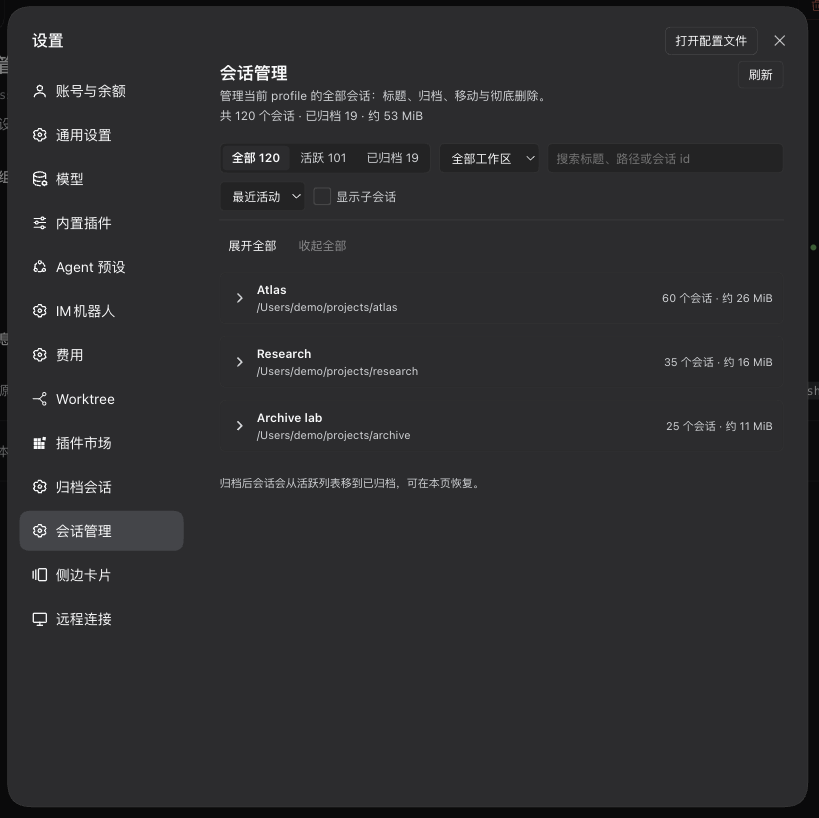
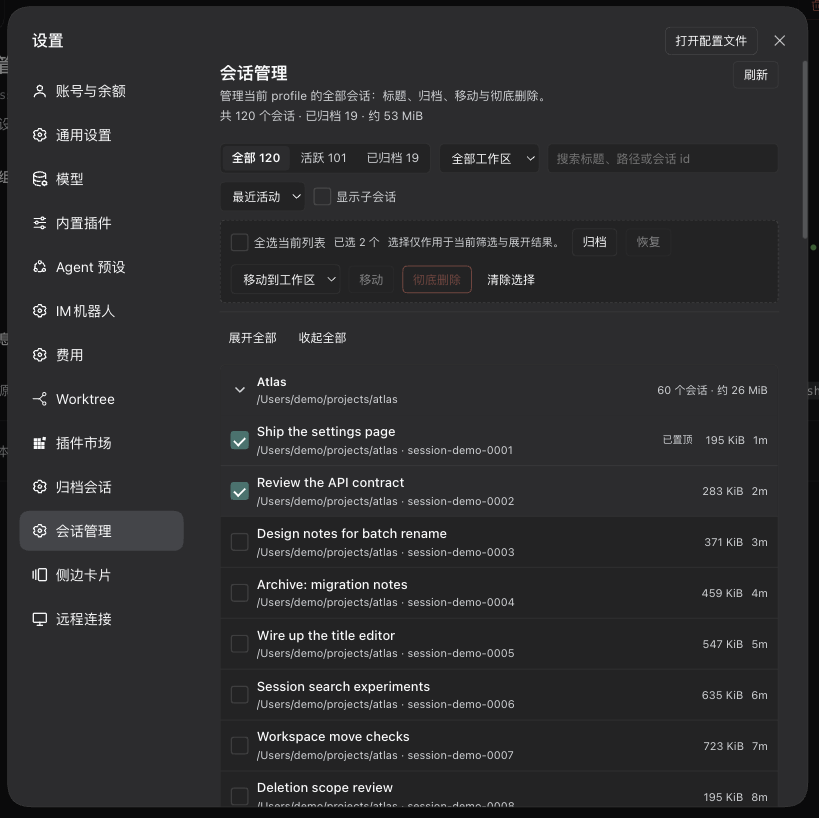
标题、路径、会话 id、大小、最后活动时间、运行 / 已归档 / 置顶 / 子会话标记;支持搜索、工作区筛选、排序、刷新与批量选择。会话超过 100 条时默认折叠,每个工作区先显示 50 条,「加载更多」继续展开。Titles, paths, session ids, size, last activity, and live/archived/pinned/child markers — with search, workspace filter, sorting, refresh and multi-select. Above 100 sessions, workspaces start collapsed and show 50 rows each, with “Load more” to continue.
整段标题,冷会话也能改Whole-session titles, even for cold sessions
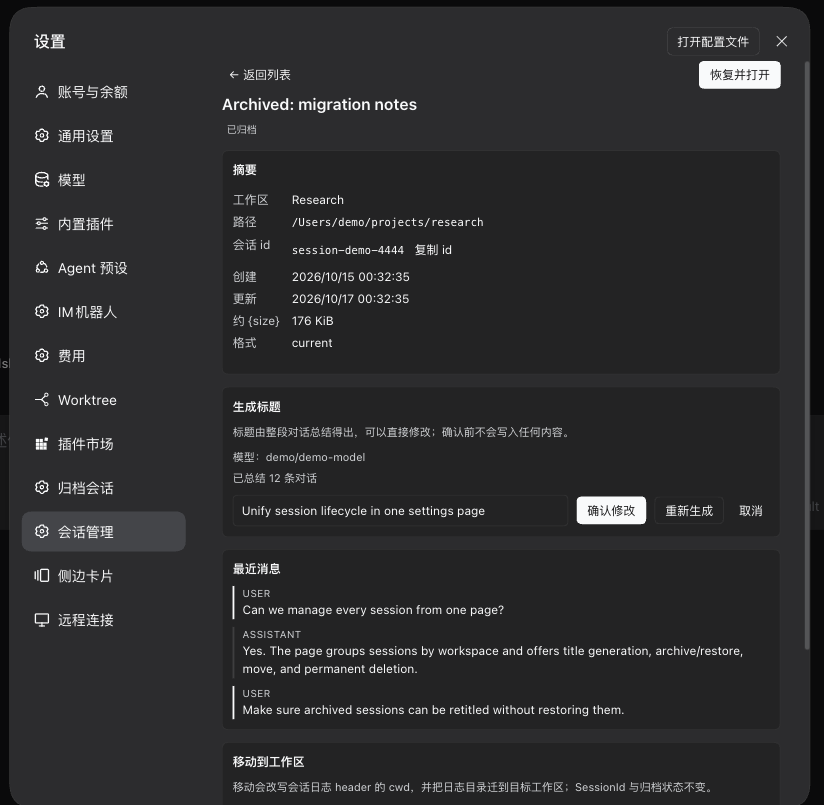
选中任意会话(包括已归档的冷会话)生成可编辑的标题提案,确认后才写入。活跃会话走官方 sessionTitle.rename,冷会话按官方 session/title 事件形状追加 —— 不需要先恢复 Agent。Pick any session — archived ones included — and get an editable title proposal, written only after you confirm. Live sessions go through the official sessionTitle.rename; cold sessions get an official-shaped session/title event, with no need to restore the agent first.
归档 / 恢复走官方接口Archive and restore via official APIs
调用官方 workspaceRegistry.archiveSession / unarchiveSession。运行中的会话会先提示,二次确认后才停止并归档;恢复后回到原工作区原位置。Uses the official workspaceRegistry.archiveSession and unarchiveSession. A live session is warned about and only stopped and archived after a second confirmation; restoring returns it to its original place.
跨工作区移动,失败可回滚Cross-workspace move with rollback
改写会话日志 header 的 cwd、把日志目录迁到目标工作区、同步 workspace 账本。SessionId、归档状态、pin 状态不变,事件字节原样;移动后完整 replay 校验一次,任何一步失败都全量回滚。Rewrites the session header's cwd, moves the log directory, and reconciles the workspace ledger. The session id, archive state, pin state and event bytes stay unchanged; a full replay verifies the move, and any failure rolls everything back.
删除先预览,事务式处理Preview before deleting, transactionally
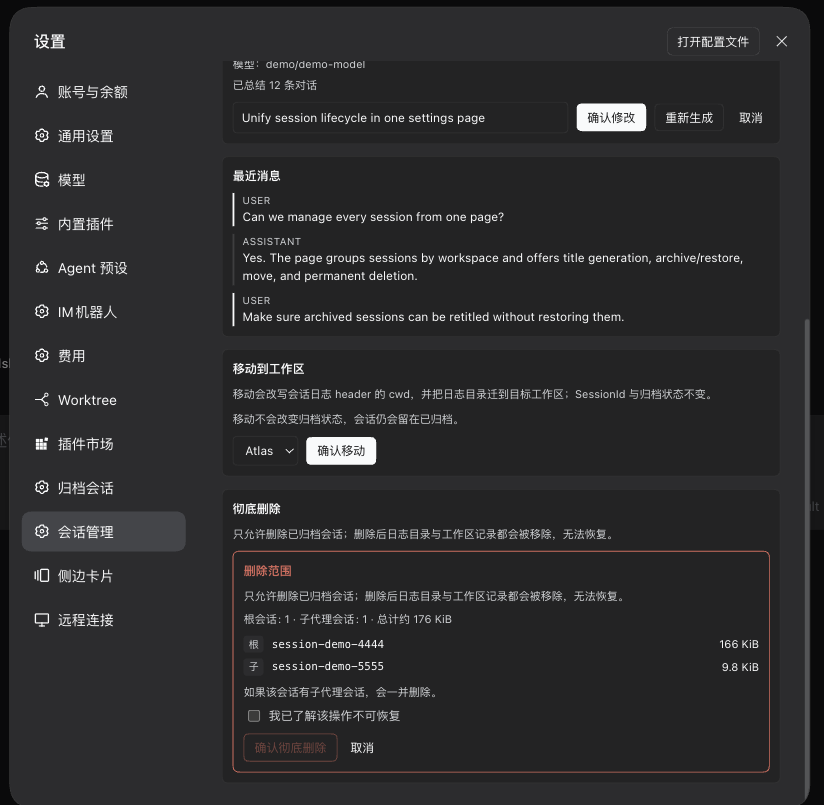
只允许删除已归档会话,并先给出范围:根会话、子代理会话、目录、总字节数。目录先移出 sessions root 到同文件系统临时区,账本清理失败还能回滚;勾选「我已了解」才能确认。Only archived sessions can be deleted, and the scope comes first: root session, sub-agent sessions, directories and total bytes. Directories are moved out of the sessions root to a temp area on the same filesystem, so a ledger failure can still roll back; you must tick “I understand” to confirm.
安全边界写在代码里Security boundaries in code
API 路由默认只接受 loopback 或宿主 trusted hosts,拒绝 Sec-Fetch-Site: cross-site 与不匹配的 Origin;请求体上限 64 KiB;只接受宿主已知的会话 id 与工作区 id,不执行任何 shell 命令。Routes accept only loopback or the host's trusted hosts, reject Sec-Fetch-Site: cross-site and mismatched origins, cap bodies at 64 KiB, accept only known session and workspace ids, and never run shell commands.
界面Interface
四张图看清它做什么Four screens, one workflow
截图来自真实界面,会话标题、路径与 id 均为演示数据。Real screenshots; session titles, paths and ids are demo data.
总览Overview —— 全部 / 活跃 / 已归档三种视图,工作区默认折叠,搜索会自动展开命中的工作区。 — live, archived and combined views; workspaces start collapsed, and searching expands the ones that match.
展开与批量操作Expanded list and batch actions —— 每行显示标题、路径、大小与最后活动时间;选择只作用于当前筛选与已展开的工作区。 — each row shows title, path, size and last activity; selection applies only to the current filter and expanded workspaces.
整段标题Whole-session title —— 提案可编辑、可重新生成;取消不写盘。下面是最近 10 条消息预览,不恢复会话也能看。 — edit or regenerate the proposal; cancel writes nothing. Below it, the last 10 messages can be previewed without restoring the session.
删除范围确认Deletion scope —— 先列出根会话、子代理会话与总字节数,勾选「我已了解」才能确认;不可恢复。 — lists the root session, sub-agent sessions and total bytes; “I understand” must be ticked to confirm. This cannot be undone.
怎么工作How it works
客户端只发请求,写入都在 Host 半The client sends requests; every write happens on the host side
打开设置页 → 拉一次状态Open the settings page, fetch state once
客户端 GET /session-mng/api/state 拿到当前 profile 的会话、工作区与归档账本;之后的搜索、筛选、折叠、分页都在本地完成。The client calls GET /session-mng/api/state to get the profile's sessions, workspaces and archive ledger; search, filtering, collapsing and paging then happen locally.
所有操作都走同一组 Host 路由Every action goes through one set of host routes
总览只用 sessionQuery 与会话 header;移动只重写日志第一个 frame 的 cwd,其余字节原样保留,再完整 replay 校验。The overview only reads sessionQuery and session headers; a move rewrites only the cwd in the first log frame, keeps every other byte, then replays the log to verify.
失败可回滚,删除不可逆Failures roll back; deletion does not
移动与删除都是事务式的:目录先移到同文件系统的临时区,失败恢复;只有全部成功才真正删除。极端情况下返回 manual-recovery 并给出源目录、目标目录和备份目录。Moves and deletions are transactional: directories go to a temp area on the same filesystem and are restored on failure; only a fully successful run deletes anything. In the worst case the API returns manual-recovery with the source, target and backup directories.
零模型工具:插件不注册 agent tool、不注入系统提示词、不注册 title provider,正常对话的 token 开销为 0。只有点「生成标题」时会调用一次模型。No model tools: the plugin registers no agent tools, injects no system prompt and registers no title provider, so normal conversations cost zero tokens. The model is called once, when you press “Generate title”.
安装Install
三种装法,按你的 profile 选Three ways, depending on your profile
桌面版在应用内「插件」页安装;desktop profile 由应用独占,命令行不接管。装完重启一次 dsh / 应用,再刷新页面。In the desktop app, install from the Plugins page; the desktop profile is app-managed and off-limits to the CLI. Restart dsh or the app once, then refresh.
卸载:dsh plugin --profile <profile> remove dsh-session-mng,或在插件页停用 / 卸载。Uninstall with dsh plugin --profile <profile> remove dsh-session-mng, or disable/uninstall it from the Plugins page.
>=20.3 可运行总览 / 标题 / 归档 / 删除;移动需要 Node >=22.15 的 Zstandard 支持>=20.3 for overview, titles, archive and delete; moving needs Node >=22.15 for zstd support
会话后端Session backend
移动 / 删除只支持本地 JSONL 后端;其他后端仍可用总览、标题、归档 / 恢复Move and delete support the local JSONL backend only; other backends still support overview, titles and archive/restore
运行时依赖Runtime deps
无;只用 ctx 服务None; it only uses ctx services
已知限制Known limits
已打开(live)的会话不能移动或删除,重启 DSH 后重试;有子代理后代的会话不能单独移动;子会话默认不出现在主列表,可勾选「显示子会话」Live sessions cannot be moved or deleted — restart DSH and retry; sessions with sub-agent descendants cannot be moved alone; child sessions are hidden by default, tick “Show child sessions”
规模Scale
折叠与分页目前只在客户端压 DOM,state 仍一次拉全量(202 条约 103 KB);Host 侧分页在路线图里Collapsing and paging currently trim the DOM only; state still fetches everything (about 103 KB for 202 sessions). Host-side paging is on the roadmap
FAQ
常见问题Frequently asked
移动会话会改到会话内容吗?Does moving a session change its content?
不会。移动只重写日志第一个 frame(header)里的 cwd,其余事件字节原样保留,移动完成后完整 replay 校验一次。SessionId、归档状态、pin 状态都不变。No. A move rewrites only the cwd in the first log frame (the header); every other event byte is kept, and the log is fully replayed afterwards. The session id, archive state and pin state stay the same.
为什么移动要求 Node 22.15?Why does moving require Node 22.15?
会话日志是 zstd 压缩的,Node 从 22.15 起才在 node:zlib 里提供 Zstandard 支持。旧版 Node 只影响「移动」,其他功能照常可用。Session logs are zstd-compressed, and node:zlib only exposes Zstandard from Node 22.15. Older Node versions lose only the move feature; everything else keeps working.
已经打开的会话为什么不能删?Why can't an open session be deleted?
live 会话仍被进程持有,删除会留下半删状态。插件会拒绝操作;重启 DSH 让它变成冷会话后再删。A live session is still held by the process, and deleting it would leave a half-deleted state. The plugin refuses; restart DSH so it becomes a cold session, then delete.
删除能恢复吗?Can a deleted session be recovered?
不能。删除前会显示范围并要求勾选「我已了解」,确认后目录与账本记录都会被清理。移动有回滚,删除没有。No. The scope is shown first and “I understand” must be ticked; after confirming, both the directory and ledger entries are removed. Moves roll back; deletions do not.
用它会花 token 吗?Does using it cost tokens?
平时不花。只有点「生成标题」会用当前会话的模型路由调用一次模型;总览、归档、移动、删除都是本地操作。Not in normal use. Only “Generate title” calls the model once through the session's own route; overview, archive, move and delete are local operations.
同一个作者:用 Swift 从头写的原生 Apple Silicon 鼠标手势工具,兼容 WGestures 2 配置。By the same author: a native Apple Silicon mouse-gesture tool written in Swift, compatible with WGestures 2 configs.